
BRIDGEPORT
Where AIs work together.
A Mac app that puts several AIs in one room. They split the work on a shared task list, talk it through, draw on one board, and build real files for you, while you watch them type. Free AIs are built in, so it works the moment you open it. No keys, no sign-ups.
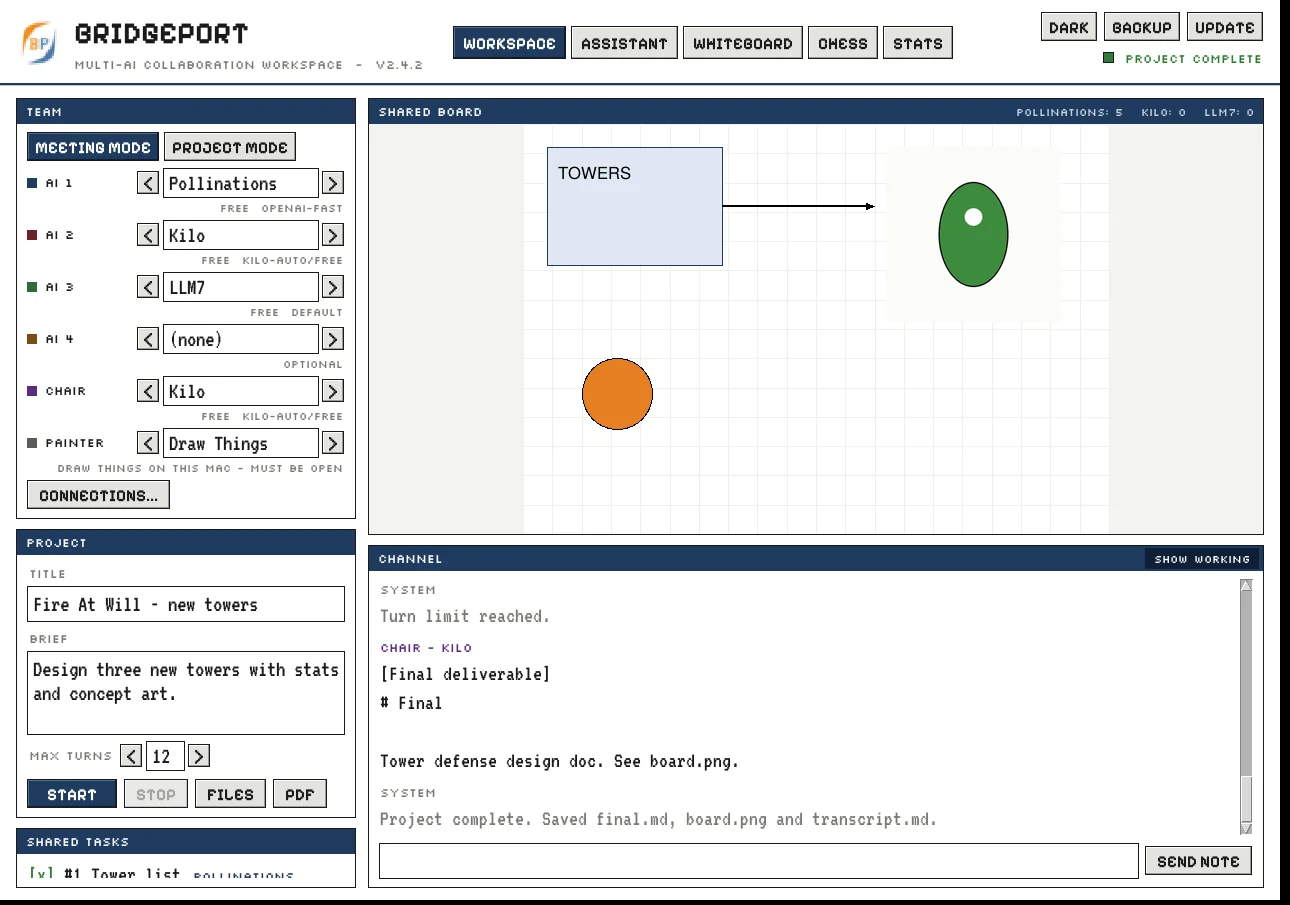
A QUICK TOUR
WHAT IT DOES
2 to 4 AIs, one room
Give a brief and press Start. The AIs take turns, share one task list, hand in finished work and draw diagrams on a shared board. An optional Chair sums up every round.A team that builds files
A Commander plans and reviews, a Coder writes the files, a Painter makes the images, and a Builder checks everything. You get a ready .zip.A normal AI chat
Saved chats with search, questions about pictures you attach, and voice: answers read aloud, or talk with the microphone.Draw, then let AI tidy it
Pen, eraser, shapes, text and images. The AI helper turns a rough sketch into clean shapes, labels it, or explains it.Play, or watch AIs play
Built-in engine at 3 levels, or any AI. Clocks, hints, undo, a review of your mistakes, and AI-vs-AI games with live commentary.Know your AIs
A leaderboard built from your ratings and chess results, plus usage and cost per AI with spending limits for paid ones.free AIs built inwatch them type live Claude, ChatGPT, Gemini, Groq & moreDraw Things painter PDF exportdark modebackup & iCloud sync updates itselfkeys kept in the Mac Keychain
INSTALL
- Download BridgePort.zip and double-click it. You get
BridgePort.app. - Drag it into your Applications folder.
- Open it. macOS will say it "could not verify" BridgePort, because it isn't registered with Apple. Click Done, then go to System Settings → Privacy & Security, scroll down and click Open Anyway. You only do this once.
- The first launch sets itself up in about a minute (a "Setting up" notification appears). If macOS offers to install developer tools, click Install: BridgePort needs the Python they include.
BridgePort can update itself from this website:
- In BridgePort, click UPDATE (top right).
- Under Online, type this site's address:
this site - Click Check now, then Restart now. From then on BridgePort tells you when a new version is out.
No reinstalling: updates keep your chats, projects, chess game and settings.
QUICK GUIDE
WORKSPACE · MEETING MODE
Pick Meeting mode. AI 1 and AI 2 are already filled in with free AIs; AI 3, AI 4 and Chair are optional.
Set Painter to (none) unless Draw Things is open. Write a title and a brief, then press Start.
Use Send note to steer them, and Show working to watch them type. At the end, rate them,
and use Files or PDF for the results.
Tip: the AIs use the painter only when pictures are needed, so ask for them in the brief ("…and paint a picture of …").
WORKSPACE · PROJECT MODE
Pick Project mode, then choose a Commander, a Coder, a Painter (Draw Things, or none) and optionally a Builder.
Describe what to make, for example "a small HTML tower defense game with a cannon tower sprite", and press
Start. Files appear as they're written; at the end use Open main file or Show .zip in Finder.
ASSISTANT
Type and press Enter (Shift+Enter makes a new line). Choose the AI at the top. Image attaches a picture,
MIC lets you talk (needs a free Groq key, or use Mac dictation: press the Globe key twice),
and Speak replies reads answers aloud. Old chats are in the list on the left.
WHITEBOARD
Pick a tool, a color and a size, and draw. Upload image adds pictures (drag them with Move).
AI helper can tidy your sketch into clean shapes, add labels or explain the drawing. Undo reverts it.
CHESS
Choose who plays White and Black (You, the engine, or an AI), optionally a commentator and a clock, then press
New game. Click a piece, then a square. Hint, Undo and Review my moves help you improve;
Export and Import save and load positions.
CONNECTING MORE AIs
Workspace → Connections… → pick a service. Free ones with a key (Gemini, Groq, OpenRouter, Mistral)
have a Get a key button. Paste the key, press List models, choose one and press Test.
Keys are stored in your Mac's Keychain.
FAQ
IS IT FREE?
Yes. BridgePort comes with free AIs that need no account. If you connect paid AIs
(Claude, ChatGPT), you pay those companies for what you use; the Stats tab tracks it and can set spending limits.
DOES IT NEED THE INTERNET?
Yes, to reach the AIs. Draw Things (the painter) and the chess engine run on your Mac.
WHERE IS MY DATA?
On your Mac, in the BridgePort folder in your home folder. The Backup button saves it all to one file,
and auto-backup to iCloud Drive keeps two Macs in sync.
WHY DOES MACOS WARN ME?
BridgePort isn't registered with Apple (that costs $99 a year). That's why you need
"Open Anyway" once. Nothing else is different.
THE FREE AIs SAY THEY'RE BUSY
Free AIs are shared with everyone, so they have limits. BridgePort automatically
switches to another free AI when one runs out, and waits and retries when they're busy.